The manual
How to draw a CS2 strat that reads at a glance
Stratdeck is a 2D tactical board for Counter-Strike 2, free to draw and export in. This guide covers every control, the three rules that make a strat readable, and how one comes together from an empty map.
1What this is
Stratdeck is a 2D drawing board for Counter-Strike 2 strategies. You put utility, players, routes and control zones on the map and export the result as one image.
Drawing and exporting are free. Saving a strat to a file, and opening it again later, is a Stratdeck Pro feature — more on that below.
This guide is the manual. Every control, what it does, and how a strat comes together.
2The strat at a glance
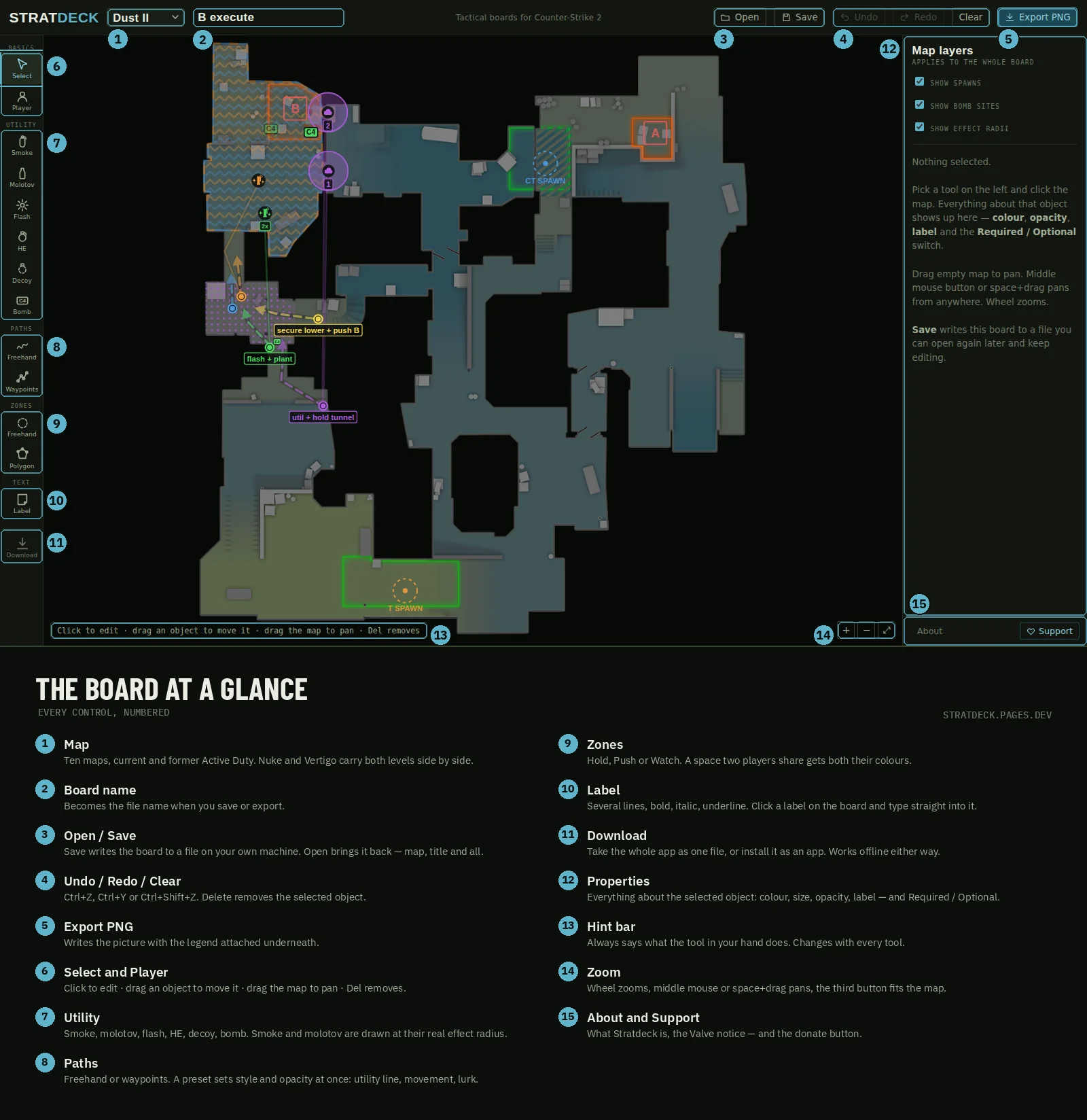
Everything on screen, numbered. The rest of this guide goes through it in order, so you can come back to this picture whenever you lose the thread.
3How to read a Stratdeck strat
Three rules carry every strat. Learn them once and you can read any picture made with this tool, including ones you did not draw.
Colour says who. Every player gets a colour. Their utility, their routes and their zones carry the same colour. If it is purple, purple is doing it.
Shape says what. A smoke is a cloud, a flash is a burst, a molotov is a rag, the bomb is a C4 tag. The shape never changes meaning.
Outline and opacity say how binding it is. Solid and full: it happens every round. Dashed and faded: it is a suggestion.
That is the whole language. Nothing else needs explaining.
4Everything about one object
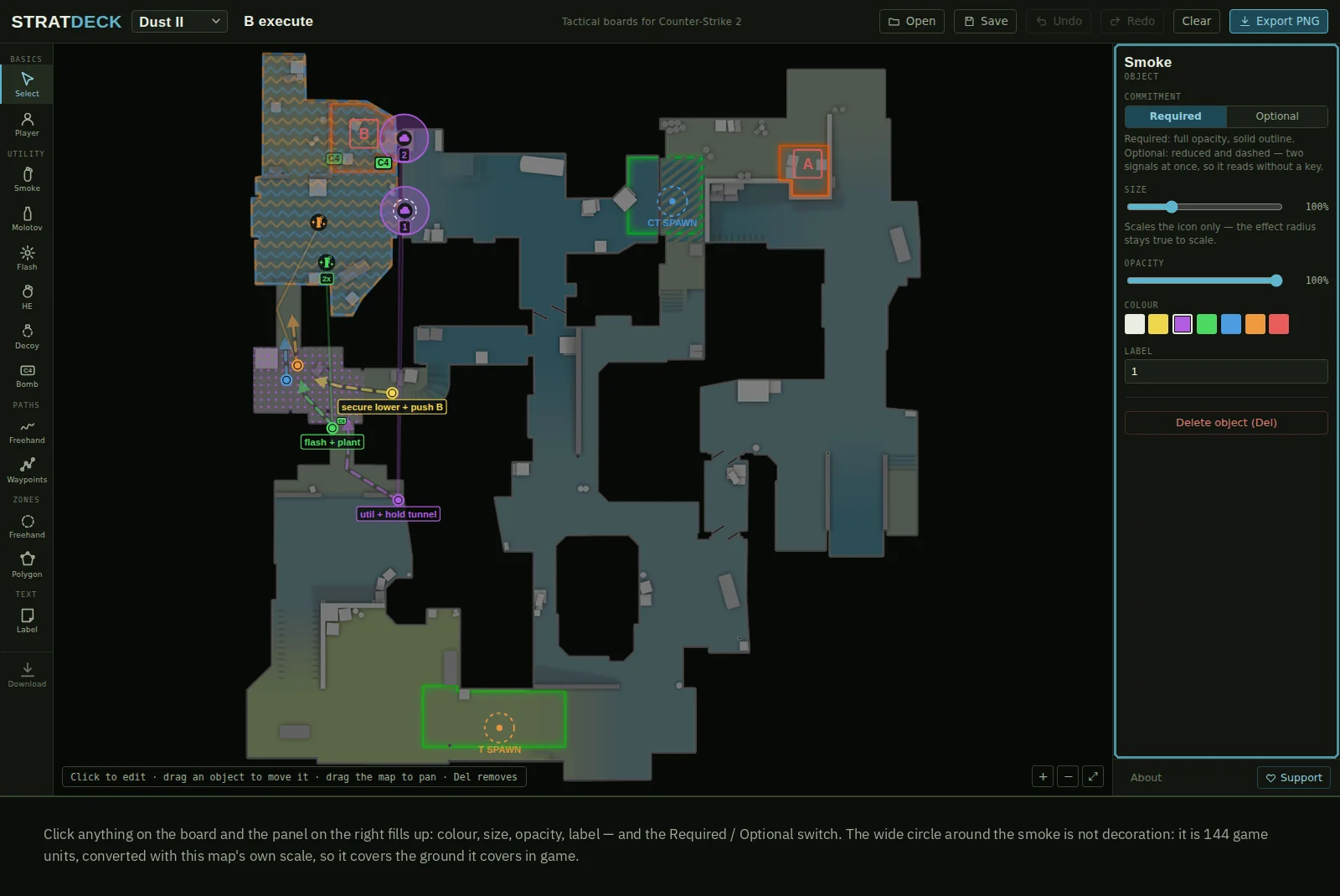
Click anything on the strat and the panel on the right fills up: colour, size, opacity, label, and the Required / Optional switch.
Nothing is buried. There is one panel, and it always shows the thing you last touched.
5Required or Optional
This is the switch Stratdeck was built for.
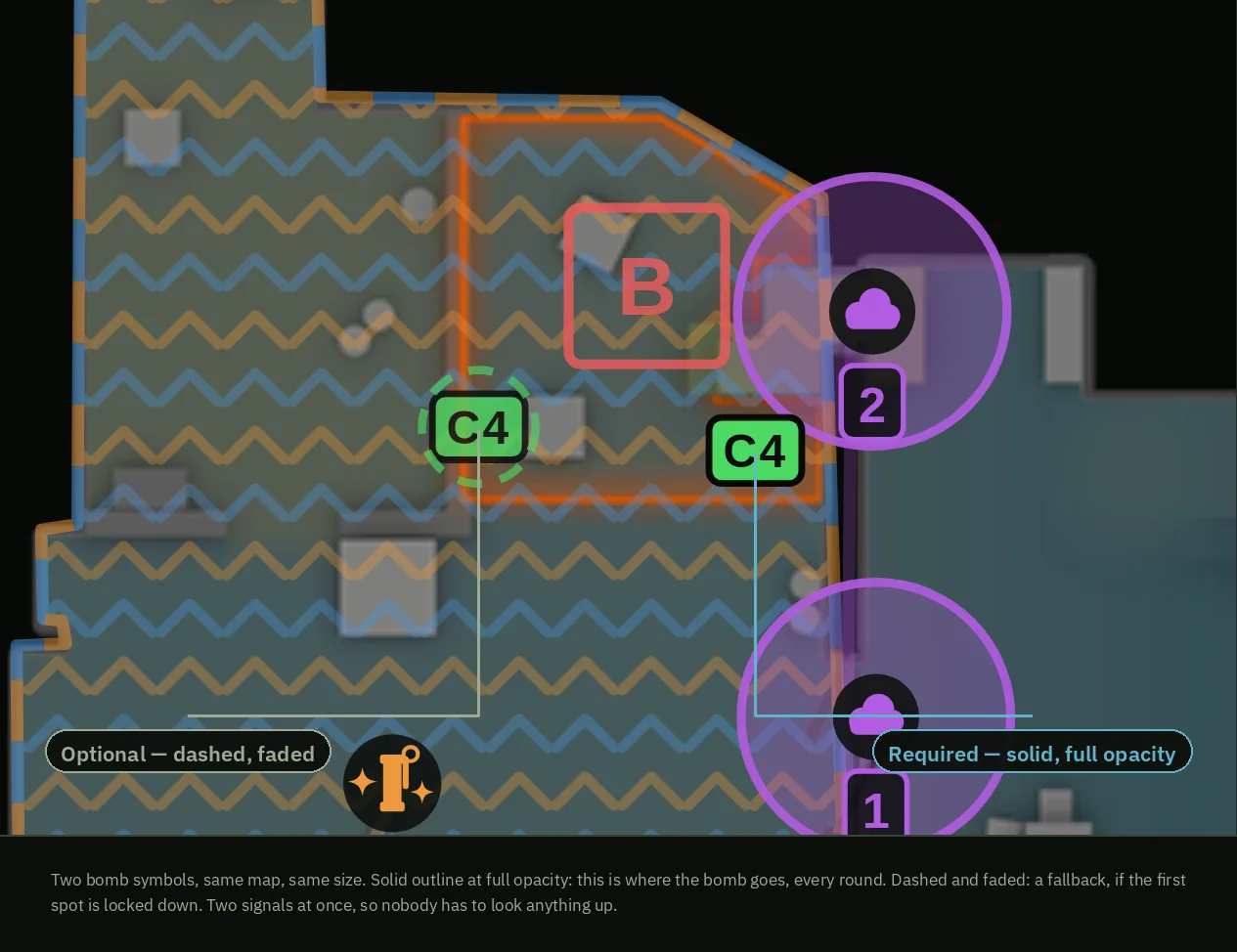
Most strats fail at the same point: everything on them looks equally important, so nothing does. Was that smoke mandatory, or did someone throw it once and like it?
Every object carries the answer. Solid outline at full opacity means it happens every round. Dashed and faded means it is a fallback. Two signals at once, readable from across the room, no key needed.
It also means the default setup and this round's variation can live on one strat without anyone mixing them up.
6Utility is drawn at its real size
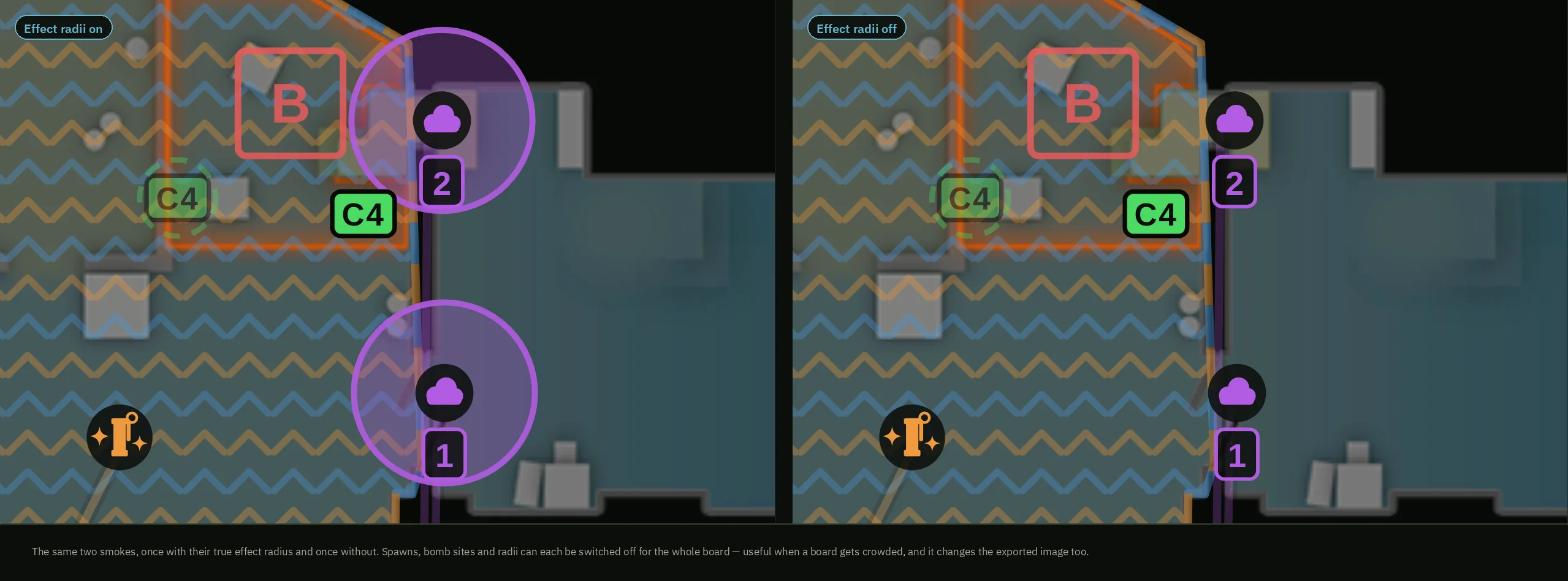
A smoke covers 144 game units. A molotov covers 150. Every map has its own scale, and Stratdeck converts per map.
So the circle on the strat covers the ground it covers in the game. Not roughly. If the circle does not close the angle, the smoke will not close it either.
Spawns, bomb sites and effect radii can each be switched off for the whole strat when it gets crowded. That carries into the exported image.
7Paths
Draw freehand, or click waypoints and finish with right-click or Enter.
A preset sets style and opacity in one go:
- Utility line — who throws it, from where. Thin and quiet, it is not movement.
- Movement — a player walks here. Dashed, with an arrow.
- Lurk — slow and alone, off the main push. Dotted.
The preset sticks to the next path you draw, so a whole set of routes takes one setting.
Finished a path and want to change it? Select it and press Edit shape. The points come back, and you can drag them, add them between two others, or delete them.
8Path Timing
A path can carry a live time, not just a route. Drop a weapon marker on it and the speed from that point on matches that weapon's real pace — knife, pistol, SMG, rifle or AWP.
Turn Path Timing on for a selected path and a knife marker appears at the start automatically, because that is what every route begins as. Add a duck marker anywhere and the active weapon's pace drops to about a third for as long as it stays toggled on.
The time updates live as you add or move markers, and sits on the path itself as a small pill you can drag along its length. It runs at each map's own scale — the same scale the utility uses.
Estimates, not millisecond-accurate — bunny-hops and jumps are not part of the calculation. Path Timing is part of Stratdeck Pro.
9Zones
A zone says what a space is for:
- Hold — they do not get through here.
- Push — take this space.
- Watch — guard this area.
Each has its own fill pattern, so they stay apart at a glance and survive being scaled down.
A space two players share gets both their colours: pick a second colour under Shared with, and the outline alternates between the two. It reads as "the two of them together", not as one inside the other.
10Labels
Place a label and type straight into it. Enter makes a new line, so a label can hold a whole callout instead of three words.
**bold**, *italic*, __underline__ — or use the buttons, or Ctrl+B, Ctrl+I, Ctrl+U.
Click any label on the strat later and the editor opens again where it stands. You never have to go looking for a text field.
11Building a strat, step by step
- Pick the map and name the strat. A single strat saves as a
.stratfile; add more strats to the same file and it becomes a.deckinstead — the extension follows what's inside, you don't choose it. - Put down the utility that has to happen. Smokes first — they decide what the rest can do.
- Mark who throws what. A utility line from the player to the smoke.
- Add the players and their routes. Movement preset, one colour each.
- Draw the zones. What gets taken, what gets watched.
- Mark what is optional. Anything that depends on the round goes to Optional.
Export. Done.
12Saving, opening, exporting
Save writes your strats to a file on your own machine — one strat is a
.strat file, several together are a .deck. Open brings
it back, every strat inside it, ready to keep editing. Saving and opening are part of Stratdeck
Pro — signed in with Steam, no separate account or password, up to five devices per licence.
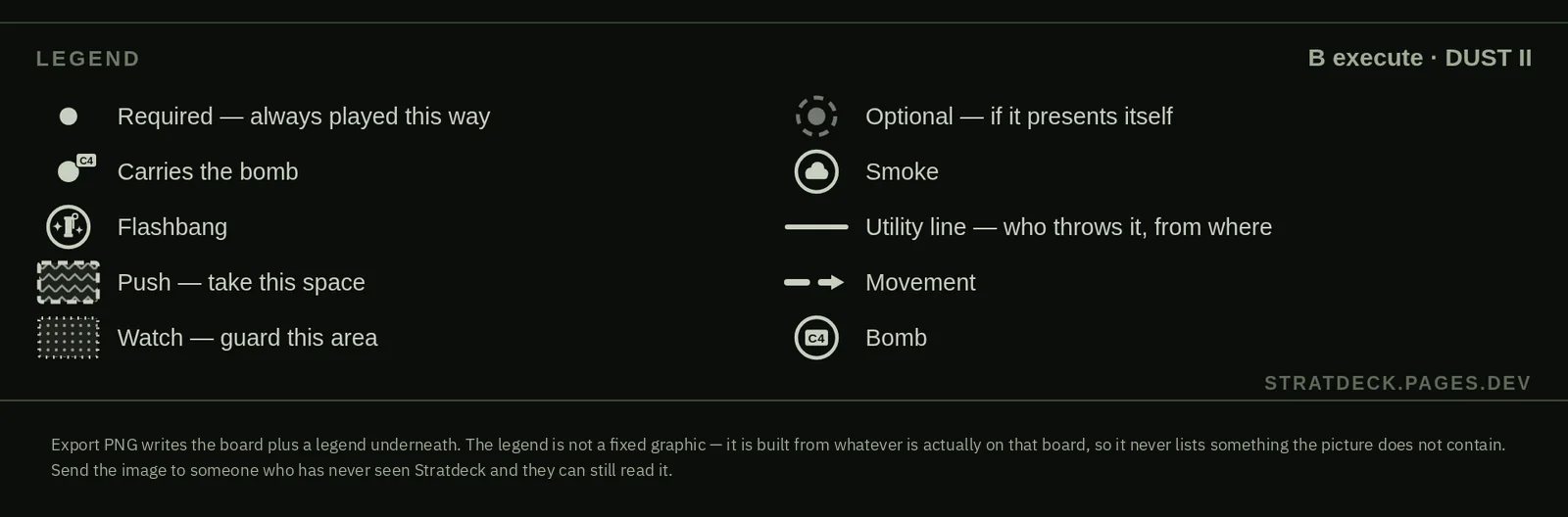
Export PNG stays free. It writes the picture with a legend underneath. The legend is not a fixed graphic: it is built from whatever is actually on that strat, so it never lists something the picture does not contain.
Send that image to someone who has never seen Stratdeck and they can still read it.
13Taking it with you
Stratdeck runs at stratdeck.app — nothing to install today. A proper offline app, its own window and its own icon in the taskbar, is coming soon.
14Working as a team
Name strats the way you call them in comms, not the way they look. Group related strats — a whole map pool, an opponent dossier, a halftime plan — into one deck, so the team opens one file instead of hunting through ten.
Save the files somewhere the team can reach. Export the PNG for the quick look, keep the
.strat/.deck file for the version you keep changing.
What's on a strat never goes to a server — only your Steam sign-in and licence check do.
15What it does not do
So nobody has to find out the hard way:
- No animated sequences. One strat is one moment.
- No lineup screenshots. Stratdeck says where the smoke lands, not where you stand to throw it.
- No cloud sync, no sharing built in — files and images only. (Signing in with Steam only checks a licence; nothing about a strat itself goes to a server.)
- No mobile layout. It works on a desktop screen.
Some of that may change. Some of it is on purpose.
16Keyboard
| Key | Does |
|---|---|
| Ctrl+Z | Undo |
| Ctrl+Y or Ctrl+Shift+Z | Redo |
| Ctrl+S | Save to a file |
| Ctrl+O | Open a file |
| Del or Backspace | Delete the selected object |
| Enter | Finish the shape you are drawing |
| Esc | Cancel the shape, or close the panel you opened |
| V | Back to the Select tool |
| Space + drag or middle mouse | Pan from anywhere |
| Ctrl+B / Ctrl+I / Ctrl+U | Bold, italic, underline inside a label |
17Credits and support
Map radar images, map names and Counter-Strike are property of Valve Corporation. Radar images and overview data are taken from the Counter-Strike 2 game files. Stratdeck is an unofficial, fan-made tool and is not affiliated with, endorsed by, or sponsored by Valve Corporation.
Drawing, exporting and this guide are free, no account needed. Saving strats and decks to a file — signed in with Steam, up to five devices — is Stratdeck Pro, a one-time purchase, no subscription.